octoja v1.0.2603 — patch control, filters and an audit trail
Highlights
This release is about control and evidence. You decide which updates reach your devices and when — a config package can skip the packages you name and hold back versions younger than a few days — and you can narrow the device list to fleet questions the quick filters cannot express. The audit log now records every sign-in with the IP address behind it, filters by source, severity, user and date, and downloads as a CSV file. Acronis Cyber Protect Cloud joins the integrations and three new checks arrive; the rest is polish and reliability — Windows patch runs finish and count what they did, devices stop dropping offline after an octoja update, and a long tail of remote-session and check fixes lands behind it.
New
- Skip packages and hold back new versions — A config package set to Update all can now skip packages listed under Never update these packages and hold back versions younger than the Minimum update age (days). The age gate covers winget and Chocolatey only. Under every other package manager everything updates, and a version octoja cannot date installs anyway. winget dates from when octoja's catalog first saw the version, Chocolatey from the real publish date. Use the manager's ID (Mozilla.Firefox, not Firefox); max 200 per deployment, 0–365 days.
- Filter the device list with a rule or a query — The device list gains an Advanced filter, built with the same rule builder as config packages, tag rules and patch policies, or typed as an OQL query, octoja's own filter language. It combines with the quick filters instead of replacing them and travels with saved views and shared links, so a view restores layout and filter together. It can never widen what you are allowed to see. If octoja cannot read a shared or edited filter, it warns you and drops your rule — the list still shows only what your permissions allow.

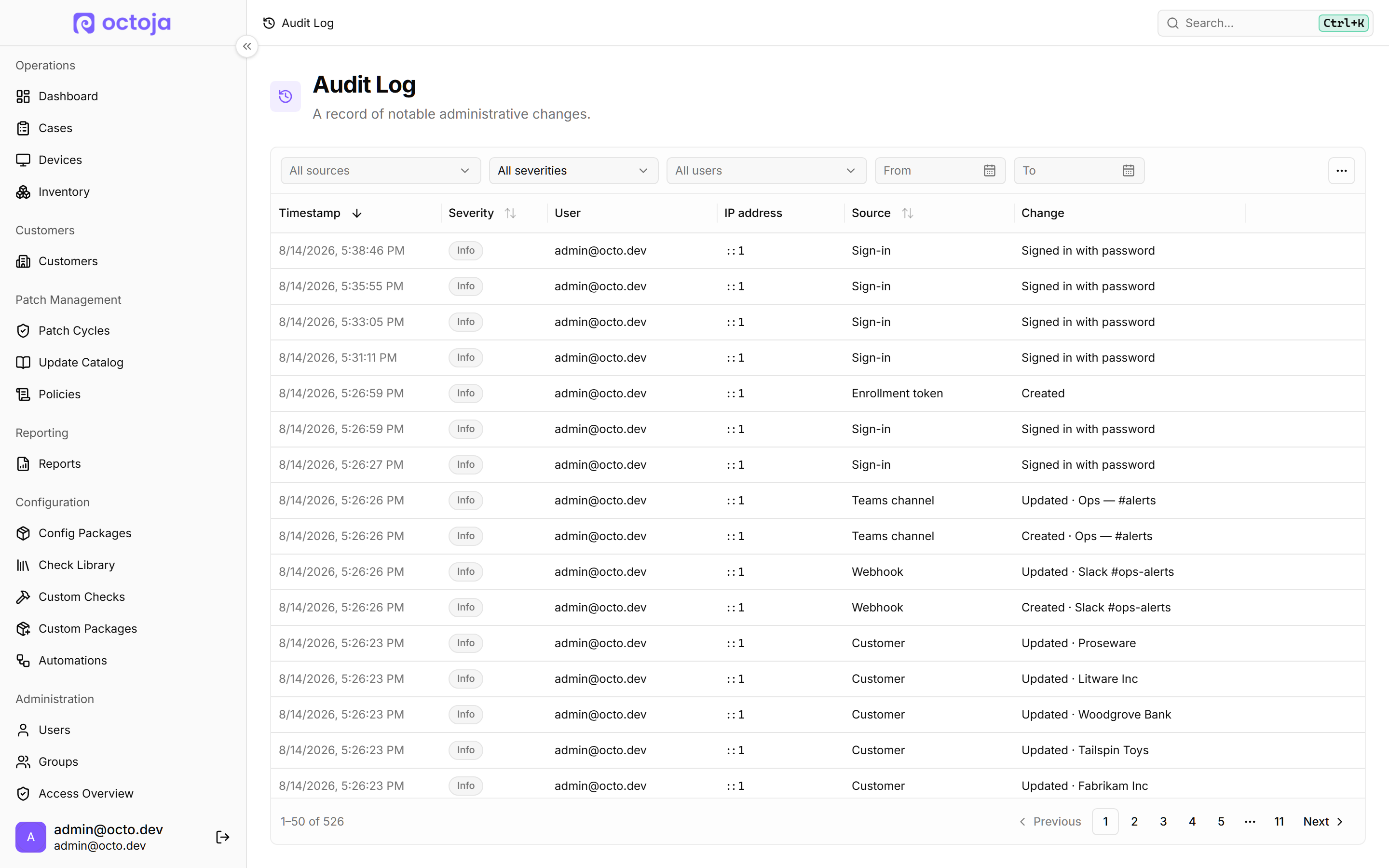
- Sign-ins, IP addresses and a CSV export in the audit log — The Audit Log now logs every sign-in, password and SSO separately, with the IP address behind each entry. Narrow by source, severity, user and date with All sources, All severities, All users and From / To, then download that with Export CSV. Every entry kind carries an IP from now on; older ones stay blank in that column. Large exports are capped: octoja tells you how many entries it wrote and asks you to narrow the filter for the rest.

- Acronis Cyber Protect Cloud integration — Connect octoja to Acronis Cyber Protect Cloud under Integrations and match each customer to their Acronis tenant with Match customers; backup protection status and Acronis alerts appear on those devices automatically. Setup needs an API client from the Acronis management console: Data center URL, Client ID and Client secret. A companion check reads last-backup age and result and active Acronis alerts from Acronis itself, nothing extra on the device. Assign it yourself, like any other check.

- Bulk actions: schedule device actions, close cases at once — Select devices and use Run or schedule action to restart, shut down or run a saved automation, Now or Schedule for later; cancel pending ones before they fire. In Cases, close several at once or add one time entry to all, max 100 cases per bulk request, shown in case history as created manually in bulk. Device-list checkboxes are always visible now, the Multiselect toggle is gone, and every action lands in the device's run history, restarts and shutdowns included.

- Share a saved view with your colleagues — Hand a saved device-list or dashboard view to colleagues with Share with other users; they find it under Other shared views in the view menu. It is read-only for them: they can adjust columns, sorting and filters for their own session and take a copy with Duplicate as new view…, but nothing they change reaches yours. Views saved before this update stay private until their author shares them explicitly.
- Three additions to automations — Target devices gains an Advanced editor for query-written rules; automations with nested rule groups, uneditable before, now open there. A Roll out Bitdefender agent step installs it where missing: Windows only, needs the Bitdefender integration connected and customer matched, up to 25 minutes. A View Automations permission gives read-only access, running saved automations and run history included, while changes still need Manage Automations, and nobody loses access on upgrade. One side effect: automations now respect customer and device scope, so users limited to certain customers see fewer entries than before.
- A TV View board with one card per device — TV View can now show one card per device carrying that device's worst result instead of one row per failing check. Switch with the Checks and Devices buttons in the header; the check board stays the default, and device cards open the device honouring your open-in-new-tab preference. The single criticality dropdown is replaced by three toggles — Critical, Warning and Offline — that combine freely, none selected meaning all, and both boards obey them.

- Update FRITZ!OS from octoja — A monitored FRITZ!Box now shows the newest firmware available and whether an update is pending, and Install update starts it after a confirmation — the box restarts and the internet connection drops for several minutes, so it needs the Run Maintenance permission. Two readings were corrected too: Max upstream and Max downstream were a thousand times too low, and the traffic counters are relabelled to show they count only since the current connection was established.
- Synology NAS hardware on the device page — The page of a monitored Synology NAS now carries a Hardware card with model, serial number and DSM version, a NAS card with system, power supply and fan status, DSM update status and temperature, and tables of its Drives and Volumes — the page previously showed only CPU, memory and interfaces. It needs SNMP to be reachable and the device typed as a NAS in octoja; models without a temperature sensor show no value rather than a zero.
- Odoo 18 and older now connect — octoja now talks to on-premises Odoo 18 and older as well as Odoo 19, works out by itself which one an instance speaks, and asks for the Username (Odoo 18 and older) that the older ones need. A connection can no longer be saved without a successful Test connection, so a wrong key is rejected at setup instead of saving and returning nothing. Existing Odoo 19 connections keep working untouched, with the username left empty.
- Send agent logs to octoja support — A device's Agent logs entry, previously Download logs, now opens a dialog first: Send logs to octoja support uploads that agent's logs and returns a reference number for the support chat, while Download now is the old one-click download. Sending shares your name and email, the device name and your Note (optional); the archive is capped at 50 MB and each upload is written to the device's log. It needs the same right that opens a device's files.
- Two additions for remote sessions — Under Auto-lock after remote desktop, On Terminal Servers, lock only the console session locks only the console when a session ends. Switch it on yourself — it is off by default and stays greyed out until the parent setting is on. Set it per device or fleet-wide in a config package. After a drag-and-drop upload, Show in Explorer opens the remote Downloads folder with the file selected — Windows only, and only with a new enough agent. Typed keys now reach the remote machine, not octoja's toolbox shortcuts.
- An RPM package for Red Hat-family Linux — You can now install the octoja agent on Red Hat-family Linux systems from a published RPM package, alongside the Debian package that was already available. Linux agent packages are also built to run on RHEL 8-era systems and newer, so a later agent update can no longer replace a working RHEL 8 installation with binaries that machine cannot start.
- Links in custom fields are clickable — A link kept in a text or multiline custom field is now clickable straight from a device or customer page: Open link opens a single one, and several are offered in a dropdown. Full addresses — including rdp:// and ssh:// — are recognised, as are ones beginning with www, which open over https; duplicates within the same field collapse to one entry.
Improved
- The update catalog and patch cycles read straight — Update Catalog entries now show status across All Devices and let you switch between every covering policy. Identifiers read as KB5034123 in patch cycle tables, update details and CSV exports; exclusions match with or without the prefix, and devices with no update yet read Pending, not Scheduled. Open patch cycles refresh at service start, hourly and on Refresh now. Affected-device counts now come from the devices listed, and ownership follows today's policy targeting. Expect both to change on updates you never touched.

- Search, filter and export a device's inventory history — You can now search a device's Inventory History, narrow it to one change type — Software, Services, Pending updates, Local users, Network adapters, System information, Hardware or Security — and download the result with Export CSV, which covers every page of the filter, not just the rows on screen. Search also finds coalesced software updates, where an old and a new version share one entry. The time-range picker has moved out of the card header into the new toolbar row.

- octoja stays responsive on large fleets — The device list, dashboard, patch-cycle and Update Catalog lists, and a customer's Alarm History (Last 14 Days) load faster; alert evaluation uses far less memory; an octoja restart no longer brings a wall of agent requests. Nothing changes about what they list, which alerts fire or what notifications contain. A check repository change reaches agents served by another instance of the service after up to five minutes; a run you start yourself and server-side evaluation are immediate. A device moved to another customer shows no Lywand Score until the next synchronization re-scores it.
- Three improvements where checks are written and configured — Script rules — status reporting, non-zero exit codes, privileges — and the SNMP helper reference now sit beside the editor in Custom Checks and an automation's Run script step, which had none. Custom checks ask only for a Name; octoja derives the identifier, so duplicates are impossible, and repository credentials can generate, show and copy a password. Whole-number settings refuse decimals, and a decimal you saved earlier is rounded on its way to the device — 92.5 arrives as 93 — so review the thresholds you typed with a decimal. Only whole-number custom fields insert as a token.
- Agentless SNMP checks take the device's own credentials — A check against a network device now uses that device's own address and stored SNMP settings automatically, so one config package covers devices with different credentials; a live test resolves them the same way. If you typed an SNMP community or version into the package, octoja now ignores it and uses the device's stored settings, so check that those are right on each network device. Devices with different credentials start working, and stale hand-typed values stop being used. Nothing is written back into the package.
- The dashboard tree follows your filters — The customer and site tree now lists only customers and sites with devices matching your active filters, and its counts match the device list exactly. The dashboard's default severity filter — critical and warning — applies to the tree too, so on first load customers with no current issues drop out; a saved default view with no severity selected brings the full tree back. Selecting a customer or site in the tree still does not filter the tree itself.
- Alert configurations say which field is wrong — When an alert configuration is incomplete, Save stays clickable and the field at fault is ringed in red, instead of a Save button that quietly did nothing with no hint which field was to blame. Thresholds, windows, schedules and names are now checked in the browser, and nothing that used to save stops saving.
- woasi tickets arrive readable — Alerts handed to woasi now carry a readable ticket subject and a plain-text problem description — check, device, status, how often it tripped, the check result and a direct link to the device — instead of raw machine data. You choose the language in octoja, not in woasi: the Ticket language field on octoja's woasi integration page sets it for both and defaults to German, so set it explicitly if your technicians work in another. Recovery has its own subject and wording; every other alert receiver keeps the neutral wording.
- Prerequisites and permissions for the agent rollout — The one-line agent install now checks the age of the Microsoft Visual C++ Redistributable, not just its presence, and replaces an outdated one before installing the agent. Without administrator rights it stops and tells you to install the newer redistributable first. The Group Policy (GPO) steps under Automatic Rollout now also tell you to give the Domain Computers group read access to the installer share and add it to the policy's security filtering — without them a rollout silently skips machines.
- One German word per concept — The German interface now uses one word per concept: Prüfung becomes Check, Fall becomes Meldung, Vorfälle becomes Incidents, Registrierung in the Windows sense becomes Registry, Anmeldedaten becomes Zugangsdaten in most places, and the check library's Datensicherung becomes Backup. Two maintenance-window options on a device now read Checks and Softwareverteilungen. English and the other languages are untouched.
- Run or schedule action moved to the Automations tab — On a device's page, running or scheduling an action now sits as a Run or schedule action button on the Automations tab, next to the automations assigned to that device and its Run history, instead of being buried in the three-dot menu at the top. The entry is gone from that menu, so it is worth knowing where it went; who may run what is unchanged.
- TV View opens devices in a new tab — Clicking an alarm in TV View now opens the device in a new browser tab if your profile is set that way, and alarm rows are real links, so Ctrl-click and middle-click open a device in a background tab where they previously did nothing of the sort. The device Alias is available as an extra column — off by default, turn it on from the Columns menu above the table.
- A dangling plug and cobwebs on idle devices — A device that has not reported in for more than seven days now carries a clearly visible cobweb on its page. The rest is decoration: an offline device's page shows a power plug dangling from its icon, and starting Wake device plays a short octopus animation that plugs it in; the plug drops back if the wake fails or the device has not returned after about 90 seconds. Nothing about how waking a device works changed.
- Two-factor entries file under octoja — Setting up two-factor authentication now files the entry in your authenticator app under octoja rather than the company's legal name, on both the admin user page and your own profile. Anyone already enrolled keeps the old entry name and keeps working — the name is fixed at enrolment and plays no part in verifying codes, so it only changes if they set two-factor up again.
Fixed
- Windows patch runs finish, and count what they did — A run no longer fails wholesale over one conflicting update, no longer reports success when the scan failed on every source, and counts installs finishing just after the window closes. A device still installing shows Incomplete, not Missed, and Incomplete blocks automatic ring promotion. Patch windows now fire at the scheduled time zone's hour on Windows versions that previously used the device's local time, as last release described. Finished runs name every update, By Update lists approved updates no device reported on, and not-applicable updates sit behind Show not applicable. Plan for two side effects. Any device under a patch policy now keeps Windows Update suppressed continuously, not only during its window, so anything relying on Windows patching itself in between loses that. Pending updates carry their current release date, so some dates shift forward and a few become eligible on a different day.
- Devices stop dropping offline after an octoja update — Devices no longer drop offline in waves after an octoja update, and a restart of the service no longer briefly reports healthy devices as offline before their connections have settled. Affected agents recover by themselves — there is nothing to re-enter, reinstall or re-approve. A browser that runs into the sign-in rate limit now says so plainly instead of showing a generic unexpected error.
- Five fixes for remote desktop sessions — On a multi-monitor Windows device, the screen you pick now receives the picture, the mouse and any resolution change, and a screen that used to stay black now streams. A held mouse button no longer sticks on the remote machine when the pointer leaves the session area or the browser loses focus; from a Mac, accented and Option-produced characters such as backslash now type into a remote Windows session instead of firing menus and shortcuts. Very large screens no longer trip a broken scaling option that forced a fall back to slower software encoding. Where an administrator has already switched on Allow physical console access without consent on Terminal Servers, connecting to that server's physical console no longer asks you whether to request the user's consent first. RDP sessions on the same server still ask.
- Software deployment and the kiosk install what they should — Devices octoja could not set Chocolatey up on now repair themselves at the next deployment attempt. They used to fail every Chocolatey package, not just the setup step, so expect long-stuck deployments to start succeeding on their own. Your own packages published with Show in Software Kiosk now install when a user presses Install instead of failing with a missing-payload error. A kiosk install also follows the package's Install for setting rather than always installing for all users: this corrects last release's note, so Current user only lands in the signed-in user's profile. winget installs work on a freshly signed-in Windows 10 session, and a Windows deployment whose one-off prerequisite download hits a network hiccup is retried, so one doomed by the network takes about half a minute longer to fail.
- Two integration fixes: TANSS matching and woasi reassignments — Matching your customers to TANSS companies opens straight away, even on instances with many thousands of companies. Companies read as Name (12345) with their TANSS customer number, so you can search by it; the list is cached for about 15 minutes, so a company created in TANSS moments ago may not appear yet. Devices moved to another customer or site reach woasi again, stop showing up there under their old customer, and no longer deliver inventory twice. Connecting woasi is lighter too: octoja sends only the changes from that point on instead of pushing the whole fleet up front, so reconnecting no longer re-sends everything.
- Local user accounts appear on the device page again — Devices that showed no local user accounts now list them again under Local Users — a single unusable value on one account, typically one that has never signed in, used to wipe the whole list. There is nothing to re-enrol; the list fills again at the device's next inventory run. The same fix stops a literal {} appearing as a value in network shares, server features and license key inventory.
- Browser translation no longer blanks the interface — The octoja web interface no longer freezes or goes blank when the browser's built-in page translation is switched on. Chromium browsers no longer offer to translate octoja at all, so anyone who was relying on that has to pick their language in octoja's own display-language setting instead, which covers English, German, French and Dutch.
- Two fixes for the macOS agent — On macOS the octoja agent no longer restarts in a loop when it cannot rewrite its own file metadata. A Mac that dropped offline this way, shortly after an agent update, comes back on its own once the fixed agent reaches it — nothing to reinstall. On a small Mac screen the Allow remote support window now fits: the instructions scroll while the button that closes it stays reachable, and a permission's Set up button disappears once granted instead of sitting greyed out.
- A failing check stops re-running every 30 seconds — A check that is alerting no longer re-runs every 30 seconds; once its failure has been reported it goes back to the interval you configured for it. The short retry is kept only for the window between the first failure and the confirmed one, so the result history of a long-failing check stops filling with an entry every half minute and gets far shorter and easier to read.
- Wake-on-LAN works through a Wi-Fi relay — Waking an offline device over the local network now works when the only online device available to pass the signal on is connected over Wi-Fi rather than by cable. Such a site used to report that no eligible device was available, so the wake could not be attempted at all.
- Automation conditions and scheduled action details — Automation step conditions on Device class match again, and you pick the device type from a searchable list instead of typing it. Conditions saved with an English value keep matching; ones typed in German — Drucker, USV, Unbekannt — still need re-picking, and switching an existing condition's variable to Device class resets its value to Unknown, so re-pick there. Scheduled and immediate restarts and shutdowns show their proper name in the run title and breadcrumb; cancelling a pending one uses scheduled-action wording.
- Ctrl+K search results stop reshuffling — Results in the Ctrl+K search no longer reshuffle as the slower ones arrive, and the entry you highlighted with the arrow keys stays highlighted, so pressing Enter opens what you were actually looking at. Instant matches keep a fixed first tier and everything that has to be fetched appears together beneath them in a stable order.
- A Linux-only check is tested the way a Mac runs it — The custom-check editor's Live test against a Mac now runs the script exactly the way the agent will, so a check that only has a Linux script gets the same verdict in the test as it does on the device, instead of failing on a wrapper the fleet never runs there.
- Two fixes your users see — Alert phone calls no longer speak the backslashes in a Windows file path: octoja replaces them with a space in the customer, site, check name and error text before placing the call, so C:\Users is spoken as “C: Users”. The restart prompt that appears on a device after updates install no longer overlaps or cuts off its buttons in German and the other languages, and the countdown sits centred above them.
- Three pieces of interface polish — Scrolling down a device's page no longer tints the pinned header strip at the top or leaves flickering artefacts behind it; devices actually in maintenance keep their coloured border and hazard stripe. In the Check Library, hovering a check's description no longer shows a help cursor that made the text look clickable, and the check details dialog no longer scrolls sideways on a small window.
Checks
Checks reach your devices separately from this release: a new or changed check arrives once that check itself is published, not with the update below.
- Three new checks — HP Warranty, DATEV and WatchGuard EPDR — HP Warranty reads a device's serial number and warns before its HP hardware warranty expires; it needs an API key and secret HP grants per business through your account manager, polls daily, and skips HPE servers, which get their own verdict pointing at HPE's warranty service. DATEV — Windows only, every 10 minutes — checks DATEV services (found automatically), the DATEV SQL instance, program path and that drive's free space, License Manager and license-server reachability; every service set to start automatically must be running, so a broad assignment can turn machines red until you fill Services to ignore, which takes wildcards. WatchGuard EPDR reports installation, running services, active protection and current definitions, including on Windows Server. One fix lands outside the three: the existing Antivirus Status check now recognises EPDR and the older Panda Adaptive Defense name, so servers stuck on a false “no antivirus” result turn green at their next run.
- Windows Update Agent Health reports the real install date — Up-to-date devices stop being flagged overdue for patching, and devices whose real last install predates your threshold start warning for the first time; expect movement both ways. The check now fails instead of warning silently when it cannot collect data at all, and stops printing Automatic updates disabled while Alert if automatic updates are disabled is off. The System Updates minimum-update-age filter no longer follows the device's time zone.
- Exclude the virtual machines you do not want watched — In Hyper-V VM Status, switch on Monitor all VMs and fill VMs to exclude, which — like VMs to monitor — accepts wildcards. In Microsoft Hyper-V Host you pick the VMs to ignore from the machines the host last reported, and a new Per-VM integration service exceptions list silences one integration service on named machines while the rest stays watched. Both lists default to empty, so existing assignments behave as before; one side effect: a degraded-integration warning now names the service and is raised once per degraded service instead of once per VM.
- Three Synology fixes — The Synology NAS check now names why it cannot read a NAS — no response, denied access, failed authentication or an invalid configuration — and flags a wrong community string as a likely cause. Denied access used to return an empty result, so expect some Synology devices to move from silence to a visible failure. Check that device's SNMP community and its access rights on the NAS; the failure was there before, just invisible. Synology Backup finds the Active Backup for Microsoft 365 tasks that really exist and says so when the NAS refuses the list, so devices stuck on a false “no backup task configured” warning turn healthy at their next run, listing jobs under their configured name instead of a numbered placeholder such as Task 1.
- Backup checks stop alarming on backups that worked — Comet Backup splits jobs by schedule and grades by log severity, not wording; index rebuilds and manual runs are listed, never graded. Permanently red devices should turn green, Warn on unconfirmed results is gone, next-run dates show per-schedule estimates prefixed ≈, and devices with no scheduled backup runs warn. Flip side: a run that finished with warnings now counts as successful, so a job that only ever warned can look healthy. Veeam Backup & Replication stops calling weekday-only jobs overdue on unscheduled days; Veeam Backup Agent tells failed queries from empty output.
- Failed Logins ignores a server's logins to itself — A domain-joined server no longer sits on critical because of its own routine failed logins, and the card states how many events it suppressed. Every event names the Reason it failed and severity follows it — only credential-type failures go critical, so devices red from clock skew, a Windows defect, an unreachable logon server or an unspecified logon error drop back; account, time and workstation restrictions still alarm. Where the regional format is not English the check was discarding every event. Those devices report real results for the first time, so expect new alarms there.
- UniFi RAM figures match the device's own dashboard — The UniFi (SNMP) check no longer counts reclaimable cache as used RAM on switches and gateways, so warnings firing on cached memory clear at the next run. Devices that publish no used-memory figure showed 0%; they now report the real value where one exists and nothing where none does, which can cross your RAM thresholds and raise alarms that never fired before. The check also waits longer for a slow reply, so gateways that intermittently reported nothing now answer.
- No offline result while octoja is still starting — The hold now covers checks you trigger by hand, and a device with a live connection counts as online even when its last recorded contact looks out of date — closing last release's settling-period gaps, where a manual evaluation could still write a false critical result and fire an alert. Trade-off: right after an octoja restart, device-online results are held back a little longer, so a genuine outage in that window is reported later.
- Two disk checks report what they really know — Missing disks stay critical in Disk Presence until you approve them under Approved missing disks, pre-filled with the currently missing disks. An alert that used to clear itself after three days now stands until you act, so expect more standing criticals. SMART Disk Health stops warning about undeterminable health on RAID-controller volumes, which RAID Status owns, so servers amber purely on that turn green. Unreadable health shows a neutral state, not a warning; real faults and temperature breaches report as before.
- NSLookup completes a short host name — NSLookup completes a short name such as SRV-DC with the device's own DNS suffix, and the result shows which name was Queried. Checks failing purely on a short name now pass, so expect a batch of criticals to clear once the check updates. Only the device's primary and per-connection suffix are tried, not a pushed search list, so fleets relying on several search suffixes still need the qualified name. Names that already carry a domain, end in a dot, or are reverse lookups of an IP address are sent unchanged.
- Two checks name the obstacle instead of showing nothing — On hosts running Docker older than 23.0, the Docker Container check now reports that Docker is too old and must be updated instead of claiming no containers were found, so hosts showing an empty list turn red once the new version lands. When ESET blocks the octoja agent from reading protection status, ESET Security tells you to exclude the complete octoja program folder including all subfolders — the path changes with every agent update — then restore any quarantined octoja files.
- The printer share counts as an admin share — With Include admin shares turned off, the Network Shares check now also leaves out the printer share Windows creates by itself, while custom hidden shares such as Data$ keep being monitored, so print servers that were flagged over open permissions on that share go quiet. Where admin shares are included, it is badged as an Admin share instead of looking like a normal one.