How software deployment works
Package managers, deployment settings, deployment schedules and permissions for installing and updating software on managed devices automatically.
octoja installs and updates third-party software on managed devices automatically. You decide which software goes to which devices and when; the octoja agent on each device handles the rest.
How it works
- You add the software to a config package — a reusable bundle of software deployments, checks, and agent settings.
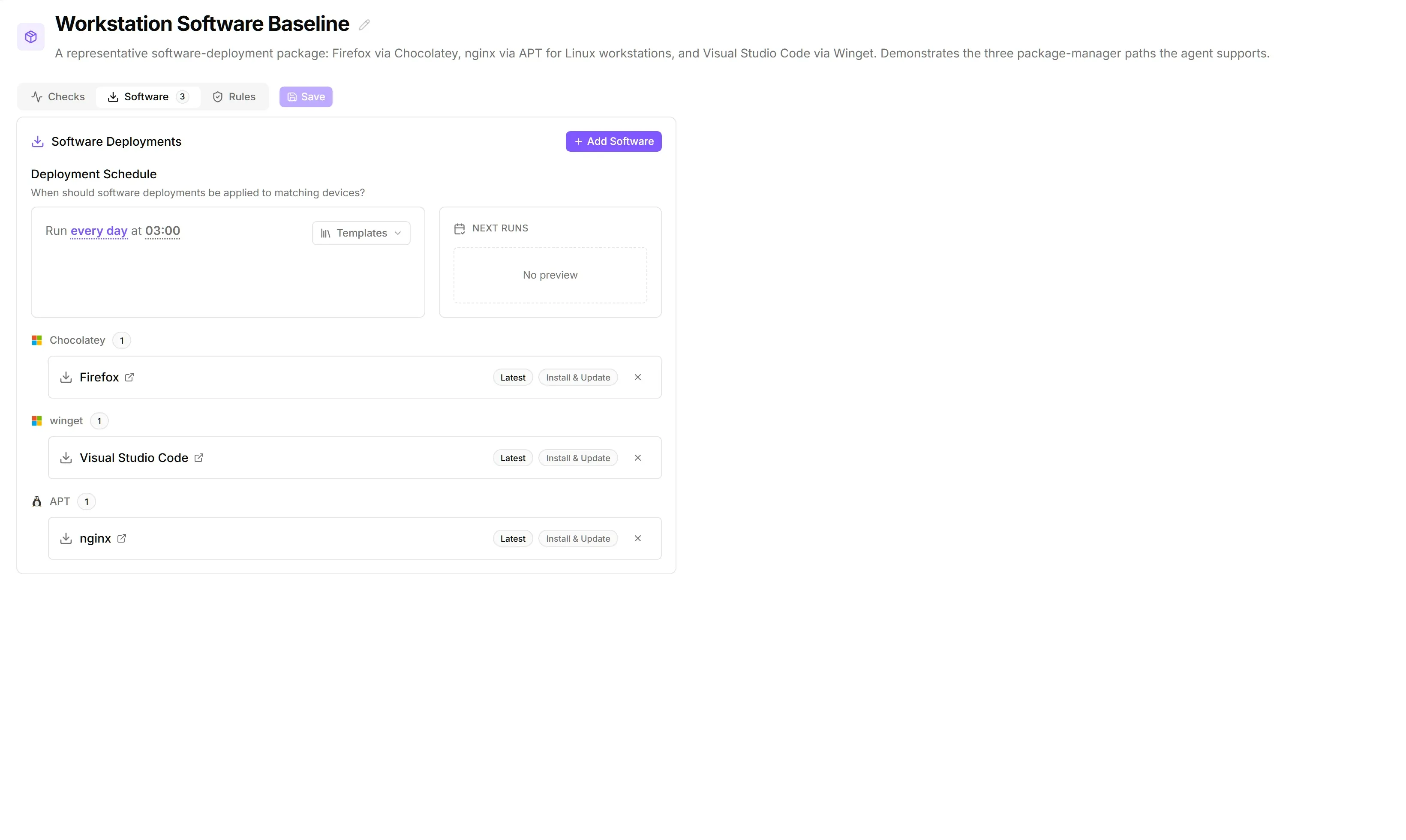
- One deployment schedule covers every software deployment in the package — every night at 03:00, say, or when the agent starts. Leave it empty and octoja keeps the software current continuously.
- Assignment rules decide which devices the package reaches — every Windows server of one customer, or every device carrying a certain tag. A package can also target one single device.
- The agent installs or updates the software with the matching package manager. A package can hold software from several package managers; each device runs only the deployments that match its operating system.
To add a deployment, see Deploy Software to Devices.
Package managers
You cannot connect an external repository for software. To deploy software that is in none of these catalogues, package it yourself — see Build and Deploy a Custom Package.
- Chocolatey has the larger community catalogue; version history is available for most packages. If a Windows device does not have Chocolatey yet, octoja installs it before the first Chocolatey deployment.
- winget ships with Windows 10 version 1709 and later. octoja uses the community source
winget, notmsstore. An unavailable Microsoft Store therefore does not block management; the community source and each package's download addresses must still be reachable. - Homebrew typically offers only the latest stable version. If an Apple-Silicon Mac does not have Homebrew yet, octoja installs it before the first Homebrew package. That needs someone signed in at the Mac with an administrator account, because Homebrew will not run as root and wants an administrator to own its files. On Intel Macs, Homebrew must already be installed. Existing installations are detected and used on either architecture.
Deployment settings
You pick the package manager on the tabs of the Add Software dialog. The choice is fixed once the deployment is added; the edit dialog shows the package manager as a read-only badge. A Mode toggle above the tabs decides what the deployment does and changes the remaining fields:
- Specific package (default) installs or updates exactly the package you choose.
- Update all outdated upgrades every package the package manager reports as outdated. This mode is optional and also covers installed software you have not assigned individually.
Specific package mode
For custom packages, you choose the published version and the package parameters instead of Install Behavior and Install Arguments; see Build and Deploy a Custom Package. Install for is labelled Run as there, with the choices SYSTEM (no interactive desktop) and Console user (with elevation).
Install arguments
For winget, the value replaces the complete installer argument line (-Override) rather than appending arguments. Enter only the vendor's documented setup arguments, including the required silent options.
For Chocolatey, octoja passes the value as --install-arguments. Enter /S, for example, not --install-arguments="/S", if the installer supports that argument.
The field does not forward winget options such as --locale or --force, or Chocolatey package parameters (--params). Parameters for custom octoja packages are separate.
Update all outdated mode
This mode hides Package Name, Version, Install Behavior and Install Arguments. Display Name remains available; leave it empty and octoja names the entry after the package manager. winget and Chocolatey also offer Install for.
Homebrew and custom packages support neither exclusions nor a minimum age. If every outdated package is excluded, nothing is upgraded.
Exclusions and minimum age apply only to the deployment or automation step where you enter them. They do not block a separate specific-package deployment or an operator's manual update-all action, and they do not roll back versions that are already installed. The minimum age is not a strict approval gate.
Deployment schedule
A config package has exactly one Deployment schedule for all its software deployments. It appears on the Software tab above the deployment list once the package holds at least one deployment.
The default is No schedule set: the package reaches its devices as soon as you save it and is re-checked every few hours, which keeps the software continuously up to date. Set a schedule runs it at fixed times instead; Remove schedule returns to continuous checking.
The schedule picker builds the schedule as a sentence and stores it as a cron expression. Next runs previews the next five runs.
Templates cover the common cases in one click, such as Every night at 03:00, Every weekday at 06:00, Every 6 hours, Last day of month at 03:00 and At system reboot.
A device in a maintenance window that pauses Deployments installs nothing until the window ends.
What happens on the device
When you save, octoja assigns the config package to the matching devices and notifies their agents straight away. At the scheduled time — or, with continuous checking, immediately and then every few hours — the agent checks each deployment:
- If the software is missing and the behaviour is Install & Update, it installs it.
- If an older version is installed, it updates it to the desired version.
- It logs the result in the device activity log with source Deployment (API:
SoftwareDeployment).
Specific-package checks without changes do not create another entry. A completed Update all outdated run, however, always records an entry, even if nothing was outdated or no version changed — so success does not necessarily mean an update was installed.
Permissions
Both are granted per group under Administration → Groups.
Related articles
Was this helpful?
Still need help? Ask the team