The audit log
Review administrative changes and successful sign-ins, filter by user and date, and export the audit log as CSV.
What the audit log is
The audit log is an instance-wide record of administrative changes made in octoja — who changed what, and when. The server writes an entry as the change is saved. Entries cannot be edited, deleted, or cleared from the interface, and there is no retention setting that removes them over time.
It records administrative changes and successful user sign-ins, but is not a complete security log. It answers questions like "who deleted that customer" or "when did this group become an administrator group". It does not record remote sessions or anything a user merely looked at. Read What the audit log does not record below before relying on it for a compliance question.
Where to find this screen
Open Administration → Audit Log in the sidebar. The page is also reachable from the command bar by searching for its name.
Access is not granted by one of the permissions on a group's Permissions tab. The audit log is reserved for administrators: a user reaches it only if at least one of their groups has the Administrator group toggle enabled (the policy behind it is named administrator). Groups, their permissions, and that toggle are all managed under Administration → Groups — see the How Users, Groups & Permissions Work and Create a Group and Assign Permissions.
For everyone else the Audit Log entry is hidden from the sidebar and the command bar, and opening the page's address directly is refused. There is no customer scoping on this page: an administrator sees every entry of the instance, regardless of which customers or devices their groups reach.
What an entry shows
Each row is one saved event, with six columns.
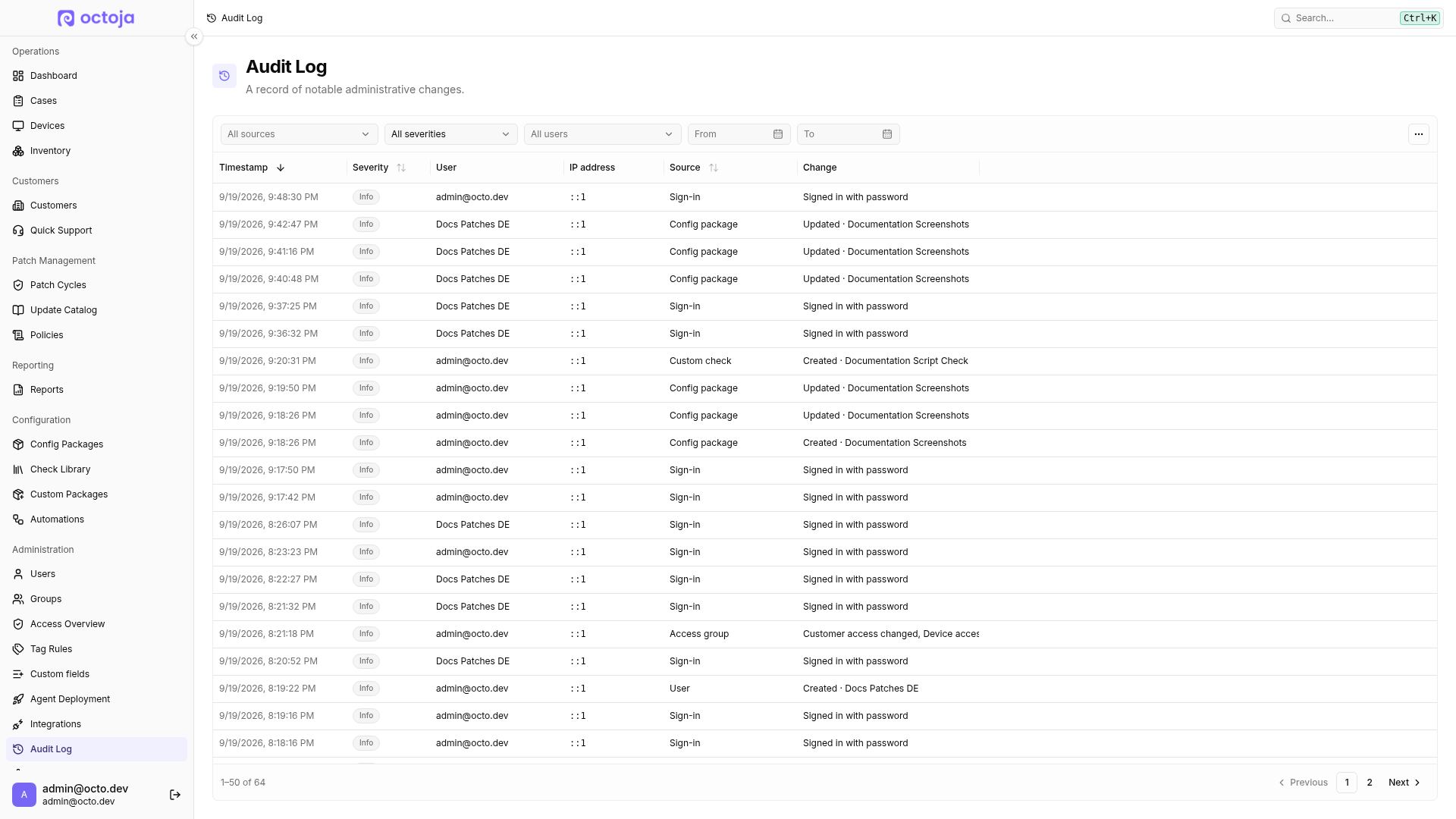
The name in the Change column is a snapshot taken at the moment of the change. Renaming or deleting the object afterwards does not rewrite older entries, so the log keeps showing what the object was called when it was touched.
Some sources put something other than a name after the middot. Reassigning a selection of devices to a customer, or setting maintenance mode on a selection, shows how many devices were in that selection; deleting a selection lists their names (the first ten, then a count of the rest). A customer import from a connected system shows the name of that system, a customer import from CSV or Excel shows how many customers were created, a blocked or unblocked update shows the KB number, and an updated or deleted package version shows the bare version string.
Severity
Every entry carries a severity. In this release octoja writes two of them:
- Info — a routine change, such as creating or editing an object.
- Warning — a destructive change or one that widens access.
Every deletion the log records is a Warning. Six further actions are also flagged as warnings:
- Switching agent enrollment to open, so no enrollment token is required
- Turning on a group's Administrator group toggle
- Disabling an automation on a device
- Cancelling an automation run
- Blocking an update
- Cancelling a patch cycle
An edit that changes several things at once takes the highest severity among them — a group edit that both renames the group and makes it an administrator group is a single Warning entry listing both changes.
What is recorded
The table lists every source the log can show, and the actions recorded for each. Anything not in this table is not written to the audit log.
Entries record that something changed, not the values before and after. An Access group · Permissions changed entry tells you the permission set of that group was edited and by whom; it does not tell you which permission was added or removed. To see the current state, open the object itself.
Devices and instance settings compare each tracked field before recording it, so re-saving one of them unchanged leaves no entry. Access groups compare the name, the permissions, the administrator status, and the members the same way — but customer access and device access are recorded whenever they are submitted, and the group editor always submits both. Saving a group's editor without altering anything therefore does write an entry, reading "Customer access changed, Device access changed" followed by the group's name.
Changes made through the octoja API are recorded exactly like changes made in the interface, because both go through the same endpoints. Actions performed by an agent on a device are never audit-log entries — the log only ever attributes a change to a signed-in user.
Sorting and paging
The newest entries come first. You can sort by Timestamp, Severity, or Source by clicking the column header; the User and Change columns are not sortable. Whichever sort you pick, entries with the same value stay in newest-first order. Sorting by Source keeps each source's rows together, but it does not put the sources in the alphabetical order of the labels you see.
The table shows 50 entries per page, and the page size is fixed. The pager at the bottom offers Previous, Next and numbered pages, and states which entries you are looking at out of the total. The … menu in the top-right corner of the table header offers Columns to hide columns you do not need and Reset columns to bring them back.
Filter and export
Choose a source, severity, user, or From and To dates above the table. For a sign-in investigation, select Sign-in, then the user and date range. The dates include the entire selected days in your browser's local time zone. Filters, sorting, and page are kept in the address, so you can bookmark or share the view with another administrator.
Use the table's CSV export to download the filtered results in the current sort order, not just the visible page. The export is limited to 10,000 entries. If octoja warns that it was truncated, narrow the date range or other filters and export the remaining ranges separately. The IP address column is not sortable.
What the audit log does not record
Coverage is deliberate: an action appears in the log only where it explicitly writes an entry. Treat the table above as the definitive list, and do not read an area's presence there as blanket coverage of everything in it. In particular, none of the following reach the audit log:
- Other authentication events — sign-outs, failed sign-in attempts, agent sign-ins, and linking a single sign-on account. Changes a user makes to their own credentials under Profile are not recorded either: changing or removing their own password, setting up or removing their own two-factor authentication, unlinking their own single sign-on account, and accepting an invitation. An administrator changing another user's password, setting up or removing their two-factor authentication, or unlinking a single sign-on account from their account is recorded — those all go through the ordinary user edit and write a User entry reading "Updated" followed by that user's name, which tells you the account was edited but not which part of it changed.
- Reading data — the log records changes only. Viewing a customer, exporting a list, or generating a report leaves no entry.
- Remote actions and sessions on a device — remote desktop, terminal, file browser, registry access, service and process control, ad-hoc scripts, on-demand checks, wake, and on-screen notifications. These are recorded per device under Activities → Logs on the device detail page instead; see Gather logs for a support case and How remote access works.
- What happened on devices — software deployments, package installations, patch installation results, and automation runs. Only the configuration decisions above are audited: the patch policy, the patch cycle approvals, the automation definition, and a manual "run now". An automation started by a trigger or a schedule is not in the audit log.
- Case activity — creating, commenting on, updating, or deleting a Case. Only manual time entries and the reassignment of a time entry to another Case are recorded.
- Reports — report templates, report schedules, and generated reports.
- Check assignments to individual devices, and custom field definitions. Config packages are recorded; assigning or unassigning a single check on a single device is not.
- Tags on devices — creating a tag and applying or removing one. Tag rules are recorded.
- Integration configuration after connecting — changing an integration's settings or its customer matching. The one exception is woasi, where editing the receiver URL, the bearer token, or the enabled switch is recorded as an update. For every other integration only connecting and disconnecting are recorded, and not every integration writes even those.
- Additional session context — the IP address can be recorded, but no browser, device, or session identifier is stored with an entry.
For recorded remote actions, open the device's Activities → Logs; the audit log and the device activity log are separate and neither replaces the other.
Related articles
For the access model behind the Administrator group toggle, see How Users, Groups & Permissions Work and How Users, Groups & Permissions Work. For how sessions and tokens work, see How sign-in works.
Was this helpful?
Still need help? Ask the team