ESET Security
Monitor ESET protection modules, real-time protection, signature age and detections locally on Windows and macOS devices, without ESET PROTECT access.
The ESET Security check runs directly on the device, every 15 minutes by default. On Windows it reads ESET Endpoint or Server Security through eRmm.exe; on macOS it supports ESET Endpoint Security and Antivirus version 7 or later through ESET's local command-line tools. Linux is not supported. Everything it reports comes from the device. No ESET PROTECT cloud access or API credentials are involved.
Prerequisites
- The device runs Windows or macOS.
- The octoja agent is installed on the device and connected.
- A supported ESET product is installed on the device. Its local query tools ship with the product, so nothing extra is installed for the check.
- You need the Monitoring Check Management permission to add or edit checks.
You do not have to tell octoja where ESET lives. On Windows, the check looks for eRmm.exe in the configured path, under %ProgramFiles%\ESET, and in the registry. On macOS it searches for the ESET app bundle under /Applications. Only a non-standard location needs Path to ESET installation: the full path to eRmm.exe or the app bundle respectively.
Steps
- Go to Devices and open the device.
- Click the Checks tab → Add Check → ESET Security.
- Keep the defaults, or adjust the thresholds described below.
- Click Add Check.
To roll the check out to many devices at once, assign it through a config package instead — see Assign checks with config packages.
Settings
The last two fields only appear once you switch on Show advanced options.
Results
The check considers both ESET's overall status and its individual protection messages and reports the highest severity. Even unrecognized warning or error messages remain visible with their description or identifier. Green real-time protection alone therefore does not mean the whole check is healthy. For a warning or critical result, open the reported component in ESET and address its cause there.
When the local query fails
If the check cannot get a usable answer from ESET's local tools, it reports a check failure and says why. It does not fall back to claiming that protection is off — an unanswered query is a collection problem, not a verdict on the device's security. The eRmm messages below apply to Windows.
Check ESET RMM access (application-info: empty result)
On Windows, application-info: empty result may mean ESET is restricting queries through eRmm.exe. In the ESET policy for the affected device, check that ESET RMM is enabled. If ESET authorizes RMM by application path, open Allowed RMM application paths and add the full path to the installed Octo.Checks.Eset.exe. ESET expects executable paths here, not a general folder exclusion. The check's path includes a version number and may need updating after a check update. Run the check again and confirm it returns protection data. See ESET's RMM settings guide for details.
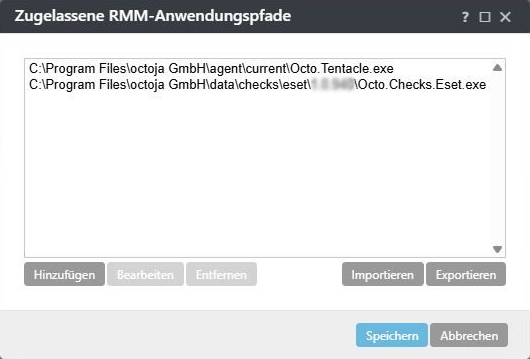
Example from the German ESET interface. Use the check path for the version installed on your device.
If ESET has quarantined an octoja file instead, that is a separate issue: investigate the detection and see Configure Antivirus Exclusions for the octoja Agent. A real-time detection exclusion does not replace RMM authorization.
If you used the ESET PROTECT integration before
The ESET card under Administration → Integrations is gone, and it no longer needs to be there. The check kept the same identity when it moved onto the device, so every assignment you already made — on individual devices and through config packages — keeps working automatically. There is nothing to reconnect, nothing to migrate and nothing to re-create. The visible differences are the name, now ESET Security, and the fact that results come from the device instead of the cloud.
ESET Security or Antivirus Status?
Both checks look at antivirus, but they are not the same thing and can run side by side. Antivirus Status is the vendor-neutral check: it reports installation, real-time protection and definition age for whatever antivirus product it finds — including ESET. On Windows clients it starts from what the Windows Security Center has registered; on Windows Server, where there is no Security Center, it probes the vendors it knows directly. ESET Security talks to ESET directly and therefore sees more: individual protection modules, the scanner module version, ESET's own advisories and the entries in ESET's threat log. Use ESET Security on devices where you know ESET is the product, and Antivirus Status where the vendor varies or you want one check across a mixed fleet.
Related articles
- Assign checks with config packages
- Set up lywand software
- Set up the Bitdefender integration
- Securepoint Antivirus Pro
FAQ
Why does the check report a protection error after an ESET license change?
Why does the check report a protection error after an ESET license change?
For vulnerability_management.not_functional or patch_management.not_functional, compare the ESET policy with the features included in your license. An enabled but no longer licensed feature can report an error through eRmm.exe even while the ESET interface appears green. Disable only features you no longer use and no longer license; keep required protection modules enabled.
Was this helpful?
Still need help? Ask the team