TCP Connections
Monitor the number of TCP connections by state and catch connection leaks or resource exhaustion early.
The TCP Connections check counts the active TCP connections on a device, broken down by state. Too many connections — especially in TIME_WAIT or CLOSE_WAIT — indicate resource exhaustion, connection leaks, or application problems. The check runs on Windows, Linux, and macOS every 5 minutes by default.
Prerequisites
- You need the Monitoring Check Management permission. Your administrator assigns permissions under Administration → Groups.
- The target device must have a connected agent.
Steps
- Go to Devices and open the device.
- Click the Checks tab → Add Check → TCP Connections.
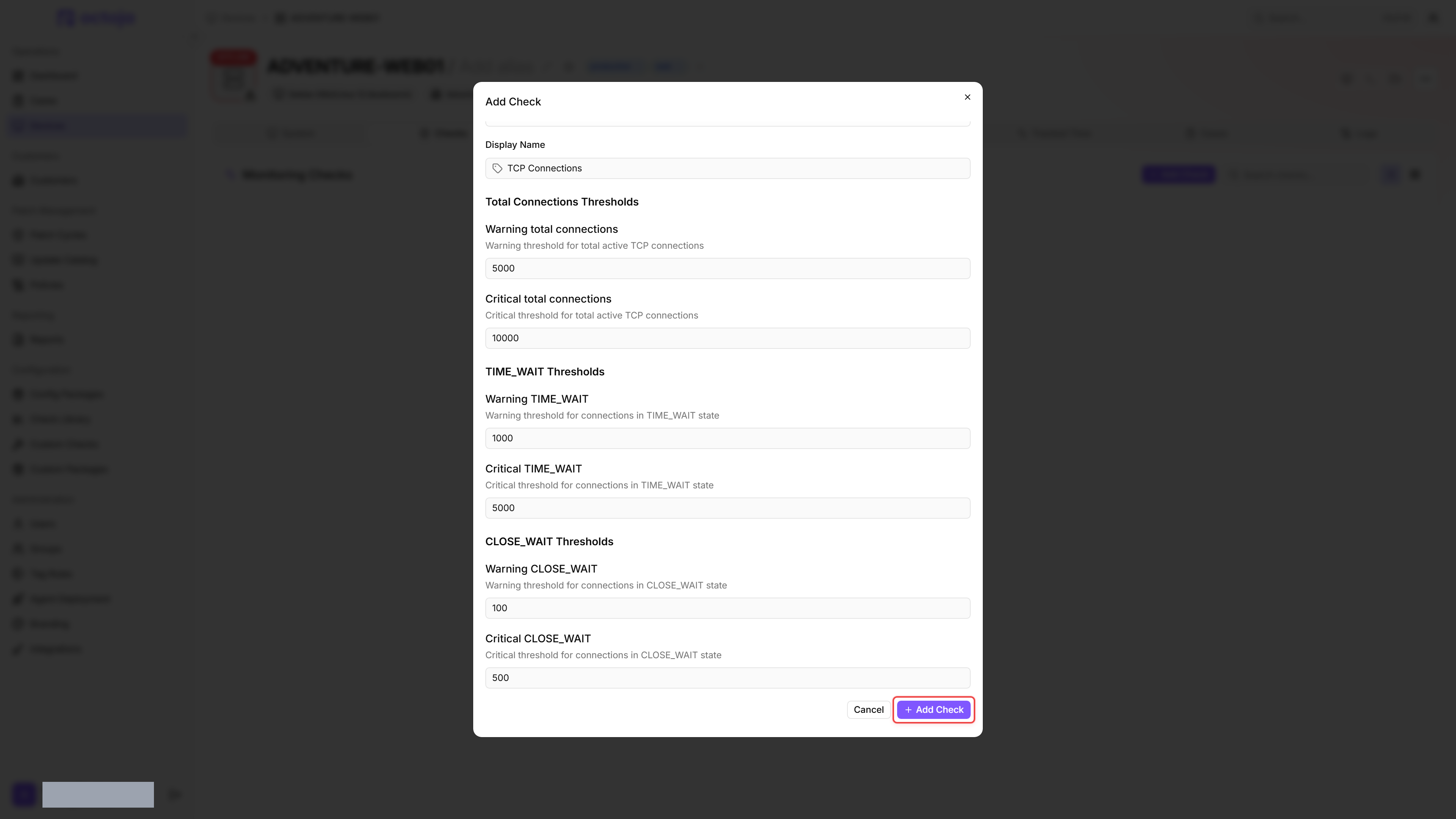
- Adjust the thresholds for total connections, TIME_WAIT, and CLOSE_WAIT if needed.
- Click Add Check.
After the first check interval, the result appears in the device's Checks tab.
Settings
If a Warning threshold is configured higher than its matching Critical threshold for the same metric, the check silently swaps the two values before evaluation.
Results
The check returns the worst result across three independently evaluated axes: total connections, TIME_WAIT connections, and CLOSE_WAIT connections. Each axis fires when its count is greater than or equal to the configured Warning or Critical threshold. If the connection counts cannot be collected, the check returns a Failure result, shown as an "Error" badge in the check detail view.
Collected metrics:
- Total Connections — total number of active TCP connections (listening sockets are counted separately under Listening)
- Established — connections in the ESTABLISHED state
- TIME_WAIT — connections in the TIME_WAIT state
- CLOSE_WAIT — connections in the CLOSE_WAIT state
- Listening — sockets in the LISTEN state
- FIN_WAIT — combined count of FIN_WAIT_1 and FIN_WAIT_2 connections
The Established, Listening, and FIN_WAIT counts are collected and reported but are not evaluated against thresholds.
Tips
- CLOSE_WAIT accumulation typically indicates a connection leak in an application — the remote side has closed the connection, but the local application never called close. This is almost always a bug, so a low threshold (100) is appropriate.
- TIME_WAIT is a normal TCP state after closing short-lived connections — it prevents port reuse collisions. High numbers are expected on busy web servers and only a concern there.
- This check is especially useful on web servers, API servers, and database servers where connection exhaustion causes outages.
Was this helpful?
Still need help? Ask the team