Ping
Monitor reachability, latency, and packet loss of hosts your device can reach using ICMP ping.
The Ping check monitors host reachability and latency by sending ICMP ping requests. Use it to detect network outages, high latency, or packet loss between the monitored device and one or more target hosts. The check runs on Windows, Linux, and macOS (each in x64 and Arm64 builds) every 10 minutes by default. It runs on the agent device and sends its ICMP packets from there, so it works on any agent device that can reach the hosts you list.
Prerequisites
ICMP ping requires the agent to have permission to send raw ICMP packets. On Linux, the agent runs as root (installed as a system service), so this is handled automatically.
Steps
- Go to Devices and open the device that will send the pings.
- Click the Checks tab → Add Check → Ping.
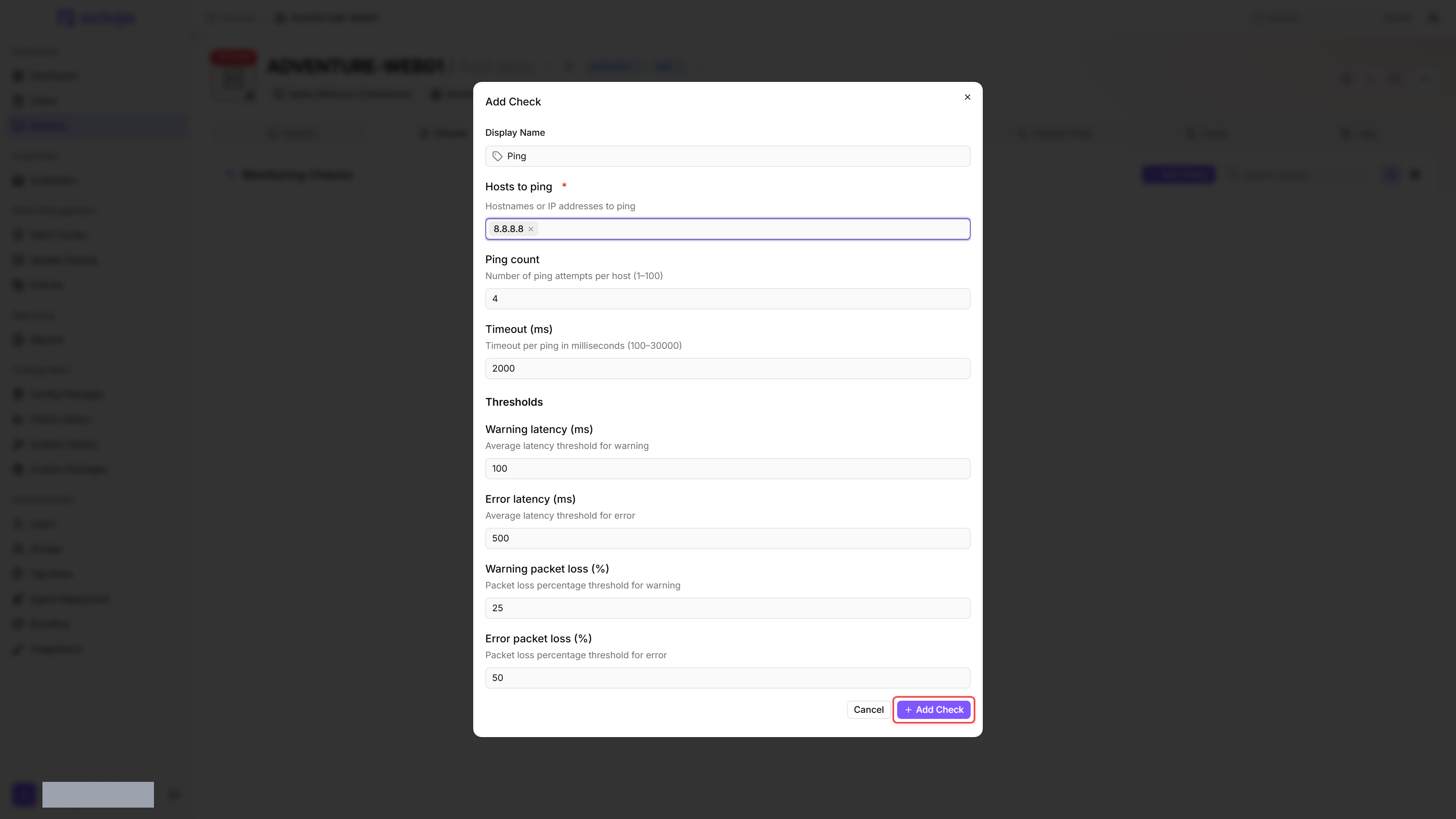
- Configure:
- Display Name: a label that identifies this check in the device's Checks list (e.g. Ping).
- Hosts to ping: one or more IP addresses or hostnames to ping (e.g. your router, a remote service). Add multiple hosts to monitor several targets with one check — the check raises an alert if any host fails.
- Adjust Ping count, Timeout (ms), and the thresholds if needed. The defaults are usually fine as is.
- Click Add Check.
After the first check interval, the result appears in the device's Checks tab.
You can assign the check to a network device as well as to an agent device. On a network device, octoja fills Hosts to ping with that device's own IP address, and the currently active one of its Monitoring assets sends the pings.
Settings
Thresholds
- Do not set packet-loss thresholds to 0%: thresholds also trigger on equality, so this would trigger even without packet loss.
- If a warning threshold is set higher than the matching error threshold (for latency or packet loss), the check silently swaps the two values before evaluation so the error threshold always sits above the warning threshold.
Results
octoja grades every check result as OK, Warning or Critical. The two Error thresholds sit at the Critical tier, so a host that reaches Error latency (ms) or Error packet loss (%) makes the check Critical.
Each host is pinged independently and reported separately. The check evaluates the average round-trip time per host — a single slow ping does not trip the threshold if the host's average stays below it. If any host's average reaches the warning or error latency threshold, the overall check result reflects the worst status across all hosts.
If a hostname cannot be resolved via DNS, the check reports that host as unresolved without sending any ping packets. Unresolved hosts are recorded with 100% packet loss and a critical status, which feeds into the worst-case overall check result.
Per host, the check collects:
- Average round-trip time (ms)
- Minimum RTT (ms)
- Maximum RTT (ms)
- Packet loss (%)
- Success count and total count
- DNS resolution status
FAQ
Why does the Ping check not detect every brief network outage?
Why does the Ping check not detect every brief network outage?
The check does not monitor the connection continuously. By default, it runs every 10 minutes. For example, if it checks at 10:00 and 10:10, an outage from 10:03 to 10:04 can go unnoticed.
The packet-loss threshold determines what proportion of unanswered pings makes a result Warning or Critical. It does not change how often the check runs. Lowering the threshold therefore does not help detect outages between checks.
Can I use a custom field as a host to ping?
Can I use a custom field as a host to ping?
No. Hosts to ping is a list and does not support custom-field placeholders, even if you enter one manually. See Custom fields → In checks for the check inputs that do support custom fields.
Was this helpful?
Still need help? Ask the team